quilt code

[JSP] 07 파일 업로드 본문

daily/웹프로그래밍

[JSP] 07 파일 업로드

김뱅쇼 2023. 3. 29. 19:29

1. 파일 업로드를 위한 form 태그 내에 반드시 설정해야 하는 기법은?


1) form 태그의 method 속성은 반드시 POST 방식으로 설정해야 함
2) form 태그의 enctype 속성은 반드시 multipart/form-data로 설정해야 함
3) form 태그의 action 속성은 파일 업로드를 처리할 JSP 파일로 설정해야 함
4) 파일 업로드를 위해 input 태그의 type 속성을 file로 설정해야함(여러개를 업로드 하려면 2개 이상 input 태그를 사용하고 name 속성에 서로 다른 값 설정)

2. 파일을 서버에 업로드하는 처리 기법?


1) MultipartRequest: 웹 페이지에서 서버로 업로드 되는 파일 자체만 다루는 클래스. 가장 간단한 방법. cos.jar
2) 아파치 API: 서버의 메모리상에서 파일 처리가 가능하도록 지원. 편리하고 강력한 API 제공. commons-fileupload.jar/commons-io.jar


3. MultipartRequest 클래스 이용


1) fileupload01.jsp

1
2
3
4
5
6
7
8
9
10
11
12
13
14
15
16
17
18
19
<%@ page language="java" contentType="text/html; charset=UTF-8"%>
<!DOCTYPE html>
<html>
<head>
<title>Jay</title>
</head>
<body>
 
    <form action="fileupload01_process.jsp" method="post" enctype="multipart/form-data">
        <p>파일 업로드</p>
        <!-- item.isFormField() : true -->
        <p><input type="text" name="title" /></p>
        <!-- item.is -->
        <p><input type="file" name="filename" /></p>
        <p><input type="submit" value="파일올리기" /></p>
    </form>
 
</body>
</html>
cs


2) fileupload01_process.jsp

1
2
3
4
5
6
7
8
9
10
11
12
13
14
15
16
17
18
19
20
21
22
23
24
25
26
27
28
<%@ page contentType="text/html; charset=utf-8"%>
<%@ page import="com.oreilly.servlet.*"%>
<%@ page import="com.oreilly.servlet.multipart.*"%>
<%@ page import="java.util.*"%>
<%@ page import="java.io.*"%>
 
<%
    MultipartRequest multi = new MultipartRequest(request, "C:\\upload"5 * 1024 * 1024"utf-8"new DefaultFileRenamePolicy());    
    Enumeration files = multi.getFileNames();
    
    while(files.hasMoreElements()) {
        String name = (String)files.nextElement();
        String filename = multi.getFilesystemName(name);
        String original = multi.getOriginalFileName(name);
        String type = multi.getContentType(name);
        File file = multi.getFile(name);
        
        out.println("요청 파라미터 이름 : " + name + "<br>");
        out.println("실제 파일 이름 : " + original + "<br>");
        out.println("저장 파일 이름 : " + filename + "<br>");
        out.println("파일 콘텐츠 유형 : " + type + "<br>");
        
        if (file != null) {
            out.println(" 파일 크기 : " + file.length());
            out.println("<br>");
        }
    }
%>
cs

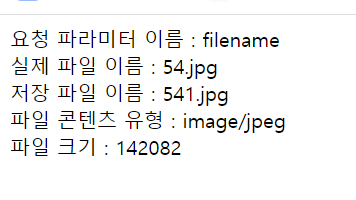
>>실행 결과


4. Commons-FileUpload


1) fileupload02.jsp

1
2
3
4
5
6
7
8
9
10
11
12
13
14
<%@ page language="java" contentType="text/html; charset=UTF-8"%>
<!DOCTYPE html>
<html>
<head>
<title>Jay</title>
</head>
<body>
    <form action="fileupload02_process.jsp" method="post" enctype="multipart/form-data">
        <!-- 폼데이터 -->
        <p>파일 : <input type="file" name="filename" /></p>
        <p><input type="submit" value="파일 올리기"></p>        
        </form>
</body>
</html>
cs


2) fileupload02_process.jsp

1
2
3
4
5
6
7
8
9
10
11
12
13
14
15
16
17
18
19
20
21
22
23
24
25
26
27
28
<%@ page contentType="text/html; charset=utf-8"%>
<%@ page import="com.oreilly.servlet.*"%>
<%@ page import="com.oreilly.servlet.multipart.*"%>
<%@ page import="java.util.*"%>
<%@ page import="java.io.*"%>
 
<%
    MultipartRequest multi = new MultipartRequest(request, "C:\\upload"5 * 1024 * 1024"utf-8"new DefaultFileRenamePolicy());    
    Enumeration files = multi.getFileNames();
    
    while(files.hasMoreElements()) {
        String name = (String)files.nextElement();
        String filename = multi.getFilesystemName(name);
        String original = multi.getOriginalFileName(name);
        String type = multi.getContentType(name);
        File file = multi.getFile(name);
        
        out.println("요청 파라미터 이름 : " + name + "<br>");
        out.println("실제 파일 이름 : " + original + "<br>");
        out.println("저장 파일 이름 : " + filename + "<br>");
        out.println("파일 콘텐츠 유형 : " + type + "<br>");
        
        if (file != null) {
            out.println(" 파일 크기 : " + file.length());
            out.println("<br>");
        }
    }
%>
cs

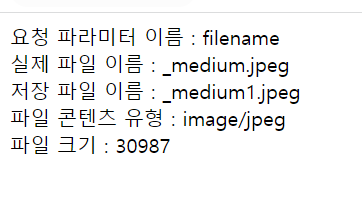
>>실행결과

'daily > 웹프로그래밍' 카테고리의 다른 글

[JSP] 09 다국어 처리  (0) 2023.04.05
[JSP] 08 유효성 검사  (0) 2023.04.03
[JSP] 06 폼 태그  (0) 2023.03.27
[JSP] 05장 내장 객체  (0) 2023.03.23
[웹프로그래밍] 03 디렉티브 태그  (0) 2023.03.20